pilli
Members
-
Joined
-
Last visited
Everything posted by pilli
-
Ok, I understand. Thanks for the reply.
-
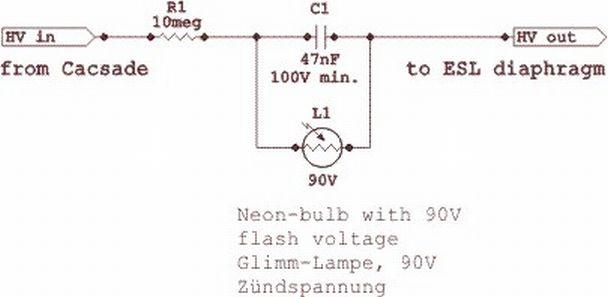
Hello, I would like to inquire about "caps in the bias supply" for Stax headphones. Spritzer and others said several times that "caps should not be used after the ballast resistor" (for example here: ) In this quoted case it refers to a cap in parallel after the ballast resistor. In other places the same is said about the cap in series, after the ballast ( What problems does the cap cause exactly, in that position? May I ask an opinion about the attached "blinker" circuit (with a series cap...), of which I read a long time ago; I have used one like this for a long time "without adverse effects" (or I think so), but I'd like to check about the dangers of a series cap. The theory of the circuit is, if my understanding is correct, that as long as the diaphragm is sufficiently charged, there is no voltage difference on the two sides of the cap; when the diaphragm loses charge, the neon will conduct and recharge it, and blink while it does this (which adds a nice effect - and too fast a blinking is a sign of charge being lost too fast). Thanks.