Skip to content
View in the app

A better way to browse. Learn more.

www.Head-Case.org

A full-screen app on your home screen with push notifications, badges and more.

To install this app on iOS and iPadOS
  1. Tap the Share icon in Safari
  2. Scroll the menu and tap Add to Home Screen.
  3. Tap Add in the top-right corner.
To install this app on Android
  1. Tap the 3-dot menu (⋮) in the top-right corner of the browser.
  2. Tap Add to Home screen or Install app.
  3. Confirm by tapping Install.

thebartman1970

Members
  • Joined

  • Last visited

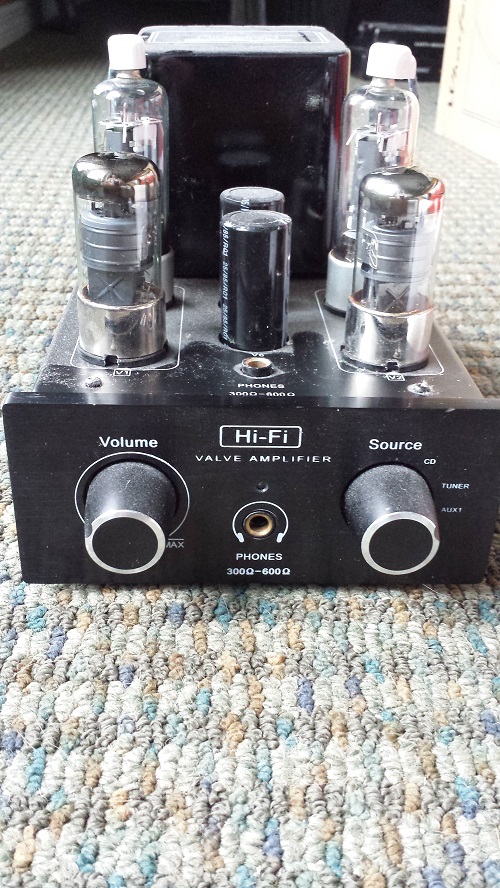
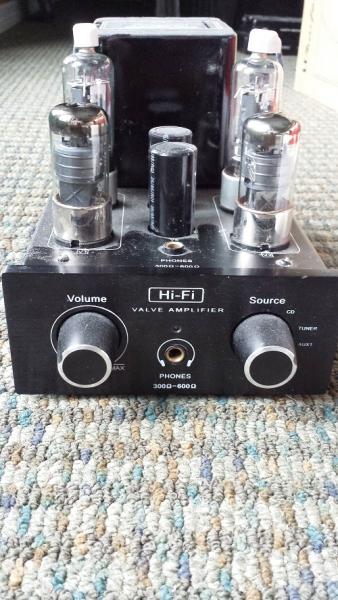
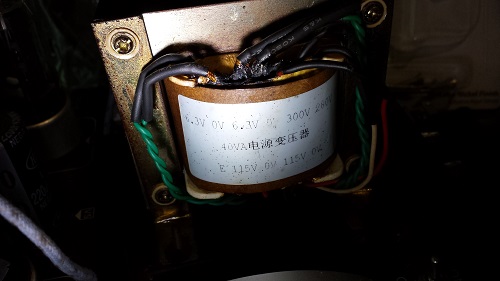
  1. Greetings all! a newbee here I have an econo phono/valve amp that I picked up years ago second-hand and have no clue where it was purchased or manufactured. It appears to have Chinese writing on it and it also does have "GUANGHENG TM300 - TM400AB" on the transformer cover. The transformer is fried and I'm not sure if it's worth repairing but I would do so if I can find one and it's a reasonable cost. Here's a couple of pics and thanks for your time.
Account

Navigation

Search

Search

Configure browser push notifications

Chrome (Android)
  1. Tap the lock icon next to the address bar.
  2. Tap Permissions → Notifications.
  3. Adjust your preference.
Chrome (Desktop)
  1. Click the padlock icon in the address bar.
  2. Select Site settings.
  3. Find Notifications and adjust your preference.