

Skip to content
View in the app

A better way to browse. Learn more.

www.Head-Case.org

A full-screen app on your home screen with push notifications, badges and more.

To install this app on iOS and iPadOS
  1. Tap the Share icon in Safari
  2. Scroll the menu and tap Add to Home Screen.
  3. Tap Add in the top-right corner.
To install this app on Android
  1. Tap the 3-dot menu (⋮) in the top-right corner of the browser.
  2. Tap Add to Home screen or Install app.
  3. Confirm by tapping Install.

vilts

Members
  • Joined

  • Last visited

  1. I made a little gif to see and show how the tritium tube looks like under different lighting conditions. http://imgur.com/V0dpYMR
  2. I am actually working on a better way to get all your knob needs met - www.knobsly.com. Prices are still tentative for the custom part and I have bunch of knobs that need to get photographed and put up there. But it's a start
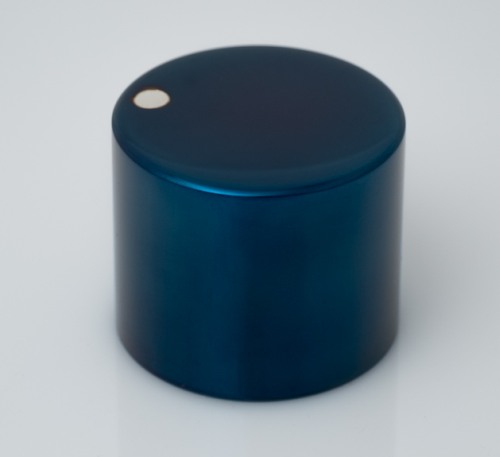
  3. Have I got some good news for knob lovers real soon... Here's a sample, heat blued steel knob with inlaid silver indicator dot.

Important Information

By using this site, you agree to our Terms of Use.

Account

Navigation

Search

Search

Configure browser push notifications

Chrome (Android)
  1. Tap the lock icon next to the address bar.
  2. Tap Permissions → Notifications.
  3. Adjust your preference.
Chrome (Desktop)
  1. Click the padlock icon in the address bar.
  2. Select Site settings.
  3. Find Notifications and adjust your preference.