Skip to content
View in the app

A better way to browse. Learn more.

www.Head-Case.org

A full-screen app on your home screen with push notifications, badges and more.

To install this app on iOS and iPadOS
  1. Tap the Share icon in Safari
  2. Scroll the menu and tap Add to Home Screen.
  3. Tap Add in the top-right corner.
To install this app on Android
  1. Tap the 3-dot menu (⋮) in the top-right corner of the browser.
  2. Tap Add to Home screen or Install app.
  3. Confirm by tapping Install.

Looser101

High Rollers
  • Joined

  • Last visited

Everything posted by Looser101

  1. Happy Birthday!
  2. Happy Birthday!
  3. That was a nice pass Sam. Well done. Larry on my model year the 5 speed is good for at least 350whp. If it breaks I'll do an sti 6 speed swap. The 6 speed is good for 600whp.
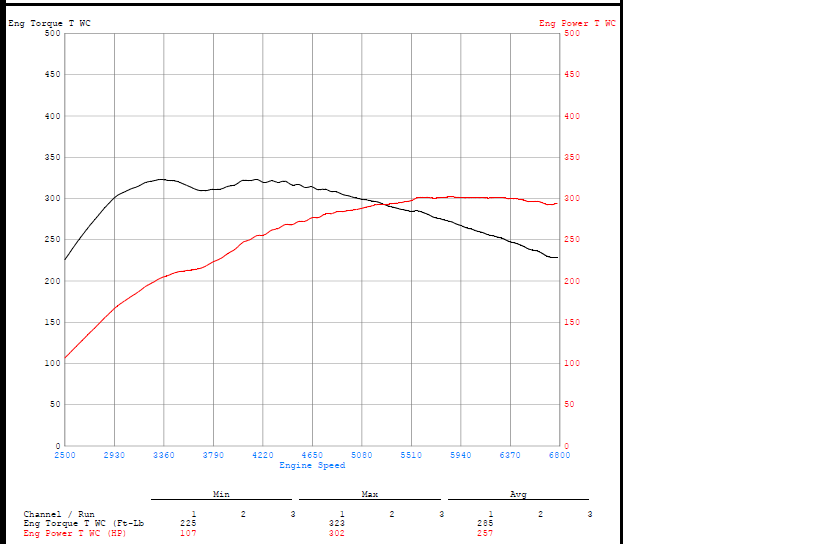
  4. Had some work done this past week. Got her tuned today. Done at Innovative Tuning in Buffalo. Follow me on Instagram: @renato1.01
  5. Happy Birthday!
  6. Happy Birthday!
  7. Happy Birthday!
  8. Happy Birthday!
  9. Happy Birthday!
  10. Happy Birthday!
  11. Happy Birthday!
  12. Happy Birthday!
  13. Happy Birthday!
  14. Happy Birthday!
  15. Happy Birthday!
  16. Happy Birthday!
  17. Happy Birthday!
  18. ^ Happy Birthday!
  19. Happy Birthday!
  20. Happy Birthday!
  21. Happy Birthday!
  22. Happy Birthday!
  23. Bored Subaru owners and some snow.
  24. Happy Birthday!

Important Information

By using this site, you agree to our Terms of Use.

Account

Navigation

Search

Search

Configure browser push notifications

Chrome (Android)
  1. Tap the lock icon next to the address bar.
  2. Tap Permissions → Notifications.
  3. Adjust your preference.
Chrome (Desktop)
  1. Click the padlock icon in the address bar.
  2. Select Site settings.
  3. Find Notifications and adjust your preference.