

Leaderboard
-
Craig Sawyers
High Rollers18Points5524Posts -
Voltron
High Rollers9Points34632Posts -
Hopstretch
High Rollers5Points16822Posts -
jose
Returning Member4Points1936Posts




Popular Content
Showing content with the highest reputation on 09/24/19 in Posts
-
Sand dunes with ice melting near the North pole of Mars4 points
-
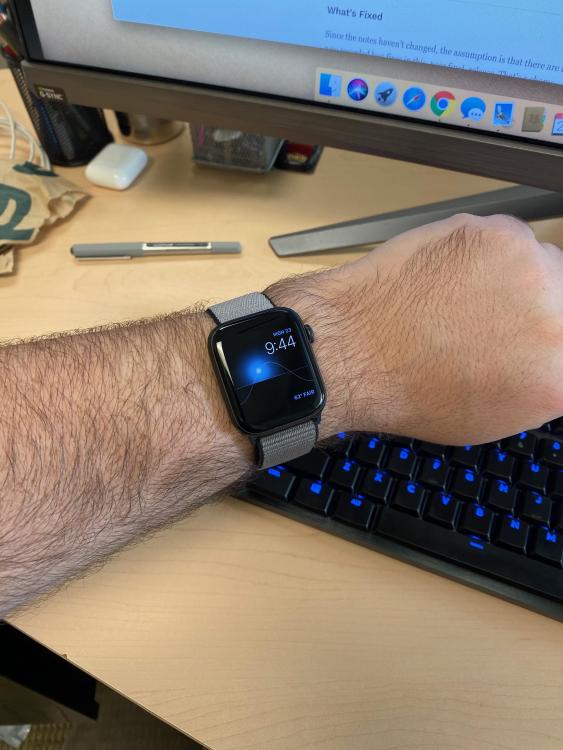
3 pointsPopped up on shuffle today. I still dig it.3 points2 points1 pointI forwarded your post to Elon, he will be in touch.1 point1 point1 pointI think Live Through This is one of the most underrated albums from the early 90's, and that it is better than any Nirvana album.1 point1 pointFirst impressions of the new watch are very positive vs. the 3rd gen one I had been using up until I broke it over the 4th of July weekend. The always-on display is a game changer for the watch and was badly needed. Not having to do the "apple watch flip" with the wrist every time you want to check the time is a godsend. Also, won't be true for everybody but I really like the lighter weight of the base aluminum watch. There are some people who like a more substantial watch on their wrist but I prefer something I barely notice. This fits the bill. The base aluminum model is noticeably lighter than the Stainless or Edition models. Yes, it feels cheaper as a result. At least for me comfort is paramount.
 1 point1 point1 point1978 Lamborghini Faena. Fishing Port in the Mediterranean, Marsaxlokk in Malta. Sunset on the West Coast of Vancouver Island. Click for slightly larger.1 pointSaw the Cardigans in '95 (?) on the Life tour at the Doubledoor in Chicago. I think there were about 50 people there.0 points







Important Information
By using this site, you agree to our Terms of Use.
Account
Navigation
Search
Configure browser push notifications
Chrome (Android)
- Tap the lock icon next to the address bar.
- Tap Permissions → Notifications.
- Adjust your preference.
Chrome (Desktop)
- Click the padlock icon in the address bar.
- Select Site settings.
- Find Notifications and adjust your preference.
Safari (iOS 16.4+)
- Ensure the site is installed via Add to Home Screen.
- Open Settings App → Notifications.
- Find your app name and adjust your preference.
Safari (macOS)
- Go to Safari → Preferences.
- Click the Websites tab.
- Select Notifications in the sidebar.
- Find this website and adjust your preference.
Edge (Android)
- Tap the lock icon next to the address bar.
- Tap Permissions.
- Find Notifications and adjust your preference.
Edge (Desktop)
- Click the padlock icon in the address bar.
- Click Permissions for this site.
- Find Notifications and adjust your preference.
Firefox (Android)
- Go to Settings → Site permissions.
- Tap Notifications.
- Find this site in the list and adjust your preference.
Firefox (Desktop)
- Open Firefox Settings.
- Search for Notifications.
- Find this site in the list and adjust your preference.