

Leaderboard




Popular Content
Showing content with the highest reputation on 11/08/25 in all areas
-
Superb sound quality, especially for a live show. Barber isn't the only star of the show. The band is amazing, especially on Black Magic Woman. The guitar solo on that song is like some Allan Holdsworth shit, the percussion kicks in and none of it is lost in the crowd who show appreciation. Ex.
 4 points
 -
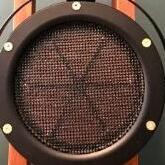
3 pointsIf you were wondering what's inside the headphones, you can see a little bit of it here3 points
-
3 points3 pointsApropos: "Why does Grindr always crash when there is a Republican convention or big event in town? Anyone meet someone (edit: that is openly anti-lgbt in words and action) famous or well known on there? Or just someone who is a raging Maga or Republican but secretly loves to have gay sex?" https://www.reddit.com/r/lgbt/s/jkk5cutnzV2 points2 points2 pointsmy marriott inner spring mattress is on it's way, to replace my 4 year old costco foam sealy2 points1 pointFamous Blue Raincoat. Songs of Leonard Cohen by Jennifer Warnes (1986) https://open.qobuz.com/album/0826663104905 Example: Very well recorded Jennifer.1 point



Important Information
By using this site, you agree to our Terms of Use.