Skip to content
View in the app

A better way to browse. Learn more.

www.Head-Case.org

A full-screen app on your home screen with push notifications, badges and more.

To install this app on iOS and iPadOS
  1. Tap the Share icon in Safari
  2. Scroll the menu and tap Add to Home Screen.
  3. Tap Add in the top-right corner.
To install this app on Android
  1. Tap the 3-dot menu (⋮) in the top-right corner of the browser.
  2. Tap Add to Home screen or Install app.
  3. Confirm by tapping Install.

Aimless1

High Rollers
  • Joined

  • Last visited

Everything posted by Aimless1

  1. Happy Birthday!!!
  2. Aimless1 replied to Aimless1's topic in Off Topic
    Nitro has learned how to remove the door from his portable kennel. This should solve the problem ...
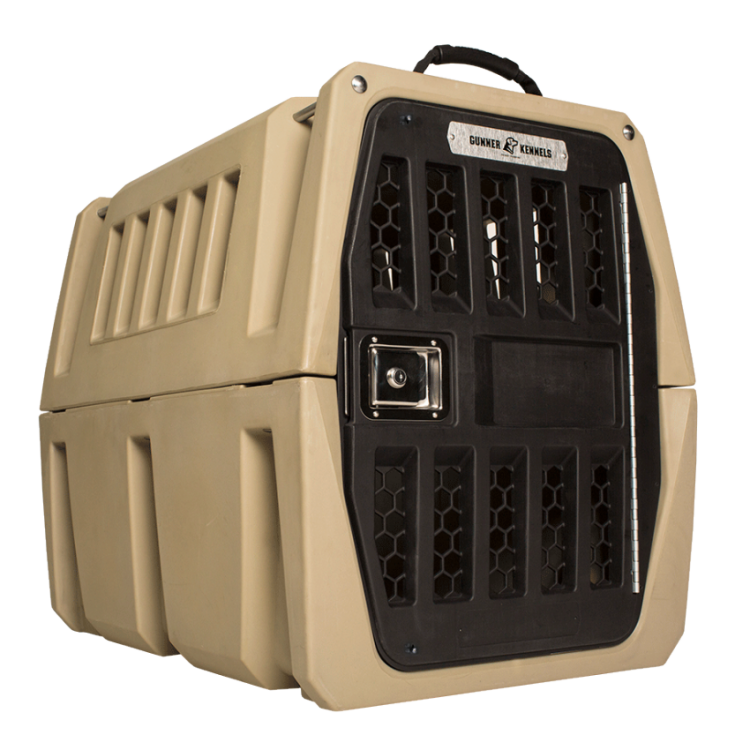
  3. Happy Birthday!!!
  4. Happy Birthday Craig!!!
  5. Congratulations Andrew .... and dad
  6. Happy Birthday
  7. Happy Birthday Dan!!!
  8. Just spit my scotch out. Looks like Nitro
  9. Happy Birthday!!!
  10. Happy Birthday Steve!!!
  11. Happy Birthday Ed!
  12. Aimless1 replied to Aimless1's topic in Off Topic
    Love the trailer.
  13. Looks like you had a great time ... and may have listened a bit as well.
  14. RIP Mike Ilitch. Owner Detroit Tigers. Owner Detroit Red Wings. Owner Little Caesar's pizza.

  15. And done
  16. Sitting in the SOS (DMV) waiting to renew my drivers license. I have #76. They're on 60
  17. Happy Birthday !!!
  18. RIP John Hurt
  19. Happy Birthday!
  20. May your day be filled with good booze, good food and good friends.
  21. Happy Birthday!!!
  22. Happy 2017 Birthday lads. Wishing both Frank and John an awesome day
  23. Iain, I like the cold but THAT is ridiculous
  24. Happy Birthday!!!
  25. Happy Birthday Jacob. Hope you're in a good place ...

Important Information

By using this site, you agree to our Terms of Use.

Account

Navigation

Search

Search

Configure browser push notifications

Chrome (Android)
  1. Tap the lock icon next to the address bar.
  2. Tap Permissions → Notifications.
  3. Adjust your preference.
Chrome (Desktop)
  1. Click the padlock icon in the address bar.
  2. Select Site settings.
  3. Find Notifications and adjust your preference.