Skip to content
View in the app

A better way to browse. Learn more.

www.Head-Case.org

A full-screen app on your home screen with push notifications, badges and more.

To install this app on iOS and iPadOS
  1. Tap the Share icon in Safari
  2. Scroll the menu and tap Add to Home Screen.
  3. Tap Add in the top-right corner.
To install this app on Android
  1. Tap the 3-dot menu (⋮) in the top-right corner of the browser.
  2. Tap Add to Home screen or Install app.
  3. Confirm by tapping Install.

Leaderboard

Popular Content

Showing content with the highest reputation on 12/12/14 in all areas

  1. Bone Marrow and Onions With everyone's favorite Brit Stretch
  2. Ribeyes, Shiraz, duck fat fries and Jeff.
  3. Also found the spot for Ari after lunch.
  4. Found the London spot for Colin. Tower Bridge
  5. We were having a bald-off! It was tie. Also featured, potted beef and bacon with Yorkshire pudding, Stilton hollandaise and two fried eggs per steak, bcos u need yr proteinz rite?
  6. Mix in some Ys and you'll be further mesmerized.
  7. I have an SB-2000 it's very nice for the size
  8. With a 45 day in home trial, there's not much risk to just doing it.
  9. Yeah, that's why I asked first. No worries.
  10. Congrats about passing the CPA exam! Yeah!
  11. Bad Dusty! I really considered the PC-2000, but I don't want to get evicted.
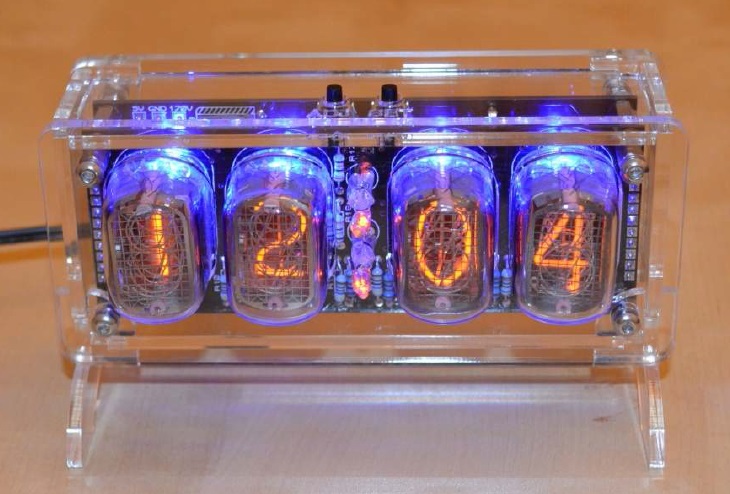
  12. Built this. (from a kit - bought the nixie tubes separately)
  13. Completed my first drive without killing myself. Wow. This is a capable car. Never driven a car with turbo before so that is going to take a little getting used to. Getting performance exhaust may not have been one of my brighter ideas. Its friggin' LOUD. Pics:

Important Information

By using this site, you agree to our Terms of Use.

Account

Navigation

Search

Search

Configure browser push notifications

Chrome (Android)
  1. Tap the lock icon next to the address bar.
  2. Tap Permissions → Notifications.
  3. Adjust your preference.
Chrome (Desktop)
  1. Click the padlock icon in the address bar.
  2. Select Site settings.
  3. Find Notifications and adjust your preference.