Pars
High Rollers
-
Joined
-
Last visited
Everything posted by Pars
-
RIP Ray Guy, Oakland/LA Raiders punter. Loved watching him when I was a Raiders fan back in the '70s/'80s https://www.cbssports.com/nfl/news/ray-guy-dies-at-72-raiders-legend-first-punter-inducted-into-pro-football-hall-of-fame-passes-away/
-
Started watching The Peripheral. Pretty good; only watched the first episode but will try to catch some more this weekend.
-
Happy Birthday Marc!
-
Happy Birthday Dusty! Hope you have a great one!
-
Happy Birthday Carl!
-
Seems like it should work with the star ground. In your drawing, you only show a single secondary from your transformers. These should be dual secondaries (or center-tapped, depending on the GRLV version). You are getting the proper +/- dc voltages from your GRLVs? You would be seeing a ton of dc offset if this were the case, just asking.
-
In general, we prefer to avoid spoon feeding newer members and encourage them to do their own research. At some point, Kevin added a 3rd bridge and the capability to use a single bridge with a CT transformer (like amb's sigma22). Obviously you don't use all 3 bridges at once. If you look at the popular post feature on the right side, above, you'll see some of the key posts in this thread. I'm not sure, but jamesmking may have done a version history of the GRLV at some point. I know he did for the GRHV. His July 27, 2021 post shown in the Popular Posts might be a good one to look at. Using the search bar and searching "largecap" will find some info, including a recommendation for what board version to use...
-
-
Happy Birthday Jim! Have some fun!
-
-
There are some 1W 510K 2512 case thick films here:
-
Happy Birthday John!
-
I use Win10 on my work laptop (was going to go Mac the last update until I discovered that it won't do OLE embedded pdfs in Office files, which is a must have for me. I normally sign out each night instead of shutting down. Once a week, at least, I find that the Explorer doesn't refresh itself, as in create a new folder it doesn't show up nav back, the back to where you were. Now it shows up as "new folder" Rename it. Still shows as "new folder" nav back... Now it appears with the correct name. Irritating, and something I never have on a Mac. Restart and move on. PITA.
-
For all you metric kids out there: what size of fasteners do you use for an L bracket to heatsink (i.e., dynahi, carbon, etc.)? M4? M5? Thanks!
-
Happy Birthday! And yes, agreed, this would never happen on postjack's forum...
-
Are you going to use relays to switch them? If you were just wanting to use a mechanical switch, I believe you will need a 4P to do that. Please correct me if I'm wrong...
-
punkydawgs is the seller. He has a current listing.
-
Happy Birthday Todd! I hope you have a great one!
-
-
Happy Birthday Antonio! Hope you have a great one!
-
Yeah, Italian beef. Dude played "Lip" on Shameless. I've been meaning to check it out.
-
Yeah, I had seen the CanJam Chicago thing in June as well. Didn't go.
-
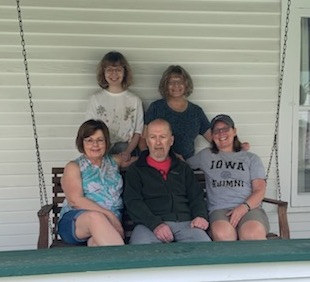
RIP Jeffrey C. Young... my younger brother. He was diagnosed with frontal lobe dementia back in 2018. He had really gone downhill in the last year. Last Thursday, he fell and hit his head and was diagnosed with a subdural hematoma and transferred to Ohio State University Wexner Hospital. Early this week, he developed pneumonia and sepsis, and passed away yesterday. This is a pic of my brother and my sisters, his wife and my niece, taken in late May when they were visiting him. #fuck dementia
-
Happy Birthday Jose!
-
Happy Birthday Birgir!