


Grahame
High Rollers
-
Joined
-
Last visited
Everything posted by Grahame
-
Or Architect's (e.g. Frank Lloyd Wright and leaking roofs)
-
Is the FOTM / FOTW HA-1 likely to get tested Tyll?
-
Another VERTICAL SCROLLING SITE, ED http://pornburger.me “PornBurger.Me”… Sounds a little dirty, right? Maybe even a bit naughty? Good. Welcome, perverts. This is not a health food blog, nor is it chock-full of recipes. Rather, it’s a year long venture into the dark arts of hamburgery. My goal? In short; pure carnal pleasure. In long; to concoct, photograph, and devour one sin-tillating burger a week, as an exercise in both my culinary and photographic passions. Let’s get weird. Subscribed
-
You may have to scale up production, off site, Colin
-
Follow EdWoods lead. Starting my training. Double double Animal Style, fries, chocolate shake.
-
As in Why Can't you Tickle yourself As opposed to the "Sleeping Beauty" (NSFW-ish)
-
MOA4 - The Moar Meat Meet?
-
I see what you did there.
-
Kids Today! https://www.youtube.com/watch?v=PF7EpEnglgk
-
A tasty Burger But where's the bacon I hear you ask? Worry Not. Don't let the rocket fool you; Bacon lurks beneath, on this brunch flatbread.
-
Is that temp for a bike ride or a sous-vide?
-
https://mobile.twitter.com/SoVeryBritish
-
Happy Birthday Brent!Is that last line your latest status update then, Steve?Happy Birthday Raffy!Voltron gel? Defender of the Unwell?What are you, wheelist?Triode's plugin is for squeezeserver. It works with software players as well as logitech hardware players .... one software player is squeezeplay http://wiki.slimdevices.com/index.php/SqueezePlay https://code.google.com/p/squeezeslave/downloads/list?q=label:SqueezePlay So you could run it https://code.google.com/p/squeezeslave/downloads/detail?name=SqueezePlay-7.8.0r328.dmg&can=2&q=label%3ASqueezePlay on your mac desktop to listen to the spotify stream ( without P2P) EDIT: or in my case
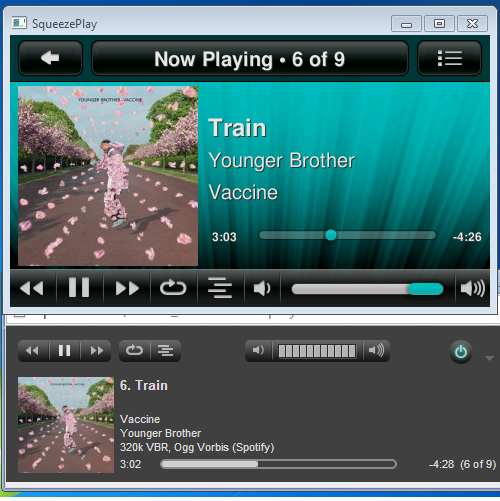 Android App - Streaming Quality = Extreme (=320K) Triode's Spotify App ( for slimserver) , (setttings) Stream Quality = 320K So you could listen to a 320K non P2P stream on a sofware player on your desktop ( or just use a smartphone over WiFi)Does it make Sacramento / I-80 tolerable, Ric?Happy Birthday!What Swiss / Pirate BSB Stereotype gives us the abomination "danalogue" then ... e.g. The LHC-208 "danalogue" streaming DAC with integrated amplifier http://www.dartzeel.com/index.php/en/Inefficient planar iems. problem solved!


Important Information
By using this site, you agree to our Terms of Use.