


dsavitsk
High Rollers
-
Joined
-
Margaret Hamilton, Pioneering software engineer whose work was critical to the Apollo moon landings the GuardianMargaret Hamilton obituaryPioneering software engineer whose work was critical to the Apollo moon landings
-
Muscles, metrosexuals and male tears: the 39 pictures that changed the way we see men (for good and for bad) https://www.theguardian.com/society/2026/oct/17/39-pictures-that-changed-the-way-we-see-men-for-good-and-for-bad “You can show two men killing each other at three in the afternoon in any country in the world on public television,” said photographer Wolfgang Tillmans in an interview in 2022. “But you can’t show two men kissing each other.” Thomas Dworzak was on a photographic assignment covering the fall of the Taliban when he stumbled on a set of highly stylised studio portraits of soldiers of the former regime in a photo shop. The fighters had probably died before they could pick them up.
-
Somehow this seems like something @blessingx would be interested in. ‘He’s terrified, panicked, can’t sleep’: the tragic, lonely death of Beatles manager Brian Epstein Spandau Ballet’s Gary Kemp paid £10k at auction for Epstein’s address book. He then used it to co-author a thrilling account of the swinging 60s – and an intimate portrait of a tormented man whose life was unravelling https://www.theguardian.com/music/2026/oct/14/beatles-brian-epstein-gary-kemp-spandau-ballet
-
She makes a Cameo on the Netflix show "How to get to Heaven from Belfast". Ep. 3 iirc. Another person to add to the list of, if not "best guitar players" at least excellent guitar players doing interesting things with the instrument is Jeff Parker.
-
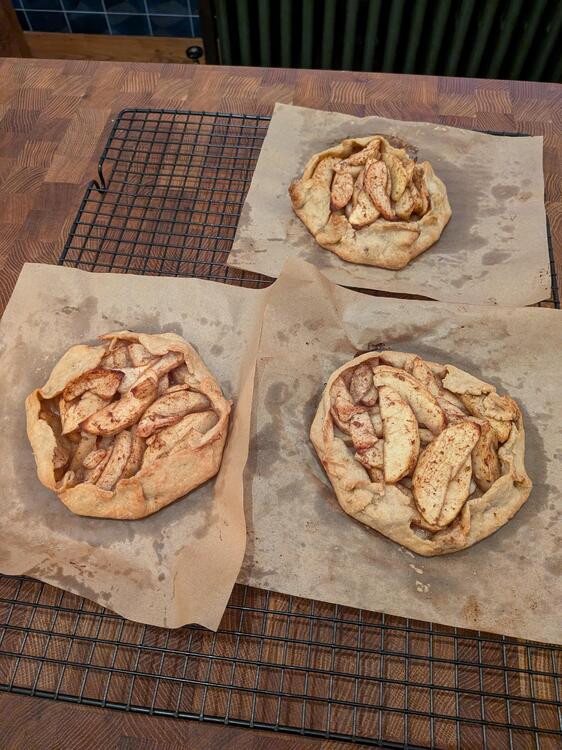
Apple galettes for a cold rainy new england day
-
FTFY pkg install firefox@KnuckledraggerEveryone is going to have their favorites. Here are mine.




Important Information
By using this site, you agree to our Terms of Use.
Account
Navigation
Search
Configure browser push notifications
Chrome (Android)
- Tap the lock icon next to the address bar.
- Tap Permissions → Notifications.
- Adjust your preference.
Chrome (Desktop)
- Click the padlock icon in the address bar.
- Select Site settings.
- Find Notifications and adjust your preference.
Safari (iOS 16.4+)
- Ensure the site is installed via Add to Home Screen.
- Open Settings App → Notifications.
- Find your app name and adjust your preference.
Safari (macOS)
- Go to Safari → Preferences.
- Click the Websites tab.
- Select Notifications in the sidebar.
- Find this website and adjust your preference.
Edge (Android)
- Tap the lock icon next to the address bar.
- Tap Permissions.
- Find Notifications and adjust your preference.
Edge (Desktop)
- Click the padlock icon in the address bar.
- Click Permissions for this site.
- Find Notifications and adjust your preference.
Firefox (Android)
- Go to Settings → Site permissions.
- Tap Notifications.
- Find this site in the list and adjust your preference.
Firefox (Desktop)
- Open Firefox Settings.
- Search for Notifications.
- Find this site in the list and adjust your preference.