MexicanDragon
High Rollers
-
Joined
-
Last visited
Everything posted by MexicanDragon
-
Paranoid - Kanye West Paranoid - Black Sabbath Paranoid - Jonas Brothers Puff (The Magic Dragon) - Seal **BRENT**
-
MexicanDragon likes this. **BRENT**
-
They take paypal now... dew eet. Yes, I know that was just a hinderance for Dinny back in the day, but, I mean, "come on." **BRENT**
-
Heh. You're old. **BRENT**
-
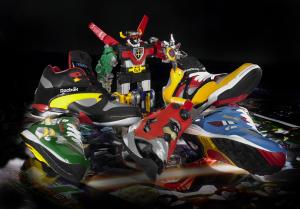
Hope you get some new kicks for your b-day, my good man. Reebok Voltron Pack Insta Pump Fury - Red Tiger Edition **BRENT**
-
Covertly conspicuous up-skirt rig for parties? **BRENT**
-
Hold off a little bit and the Nexus One will be on Verizon. :whale: **BRENT**
-
Heh. That split is one exit from where I'm at. 8 hours, eh? Yeah, I don't blame you or him, that's a good bit of time for a 5 year old. Fitz was in the car for only 7 hours at DJ and you saw how cranky he was... **BRENT**
-
Heh. I'm pretty sure you passed through about 3-4 miles from where I live. Had I known we coulda met up for dinner or some nonsense like that. Alas. **BRENT**
-
**BRENT**
-
Don't have the pics of my actual gear, but the first "wow" moments I had came when I was around 14 and saved birthday money up to get this rig. with Sony D-465 + Koss PortaPro Jr. with a player with a 10 hour battery life. I remember getting 8$/pair Energizer Lithium AAs from camera stores to get 18-20 hours. That was great until my brother "borrowed" it then somehow wound up in police impound, and my awesome-at-the-time rig was torn apart. In 2001 I jumped to SR-80s, and I think that carried me into Head-Fi, and I've actually gone through quite a bit of gear since. First amp was a Xin Supermacro v1 w/switches which came around right before HF-1s came out, so I guess 4g iPod -> SM1 -> HF-1 was the first "kinda real" headphone rig I had. **BRENT**
-
Look, if it rhymes with "Fitz", it probably blows. Happy birthday, you filthy animal. **BRENT**
-
fanboi **BRENT**
-
Is anyone still on the fence about these? I figured people were either saving up or waiting for the right financial time to place the order. Or, possibly, waiting on JH13 v JH16 impressions. Other than that, I see little reason for anyone thinking about it to not just place the order. **BRENT**
-
Dusty approved? ThinkGeek :: Reveal Watch **BRENT**
-
First iPad ad premieres during the Oscars -- Engadget See it here! **BRENT**
-
Heh @ those dainty little glasses for those dainty little boys... and Gene. **BRENT**
-
n_maher logged off. [MexicanDragon] Happy Birthday, n8. [MexicanDragon] bah! **BRENT**
-
Heh, I love that the ad I get from Google ads is for the Nexus One. Back to reading... I saw a couple tweets about it from Topolsky, first chance I've had to read it. **BRENT**
-
:rollseyes: Ok, ladies... let's get this back on topic. **BRENT**
-
**BRENT**
-
H(belated)BD! I still need to find time to get down there to check 'em out, but don't know when that will be. **BRENT**
-
:facepalm: acutally :facepalm: **BRENT**
-
Specifically the track "One Sweet World" off Disc 1. This is my favorite Dave and Tim acoustic song, which was track 1 side 1 of "Live at Luther College". Think I like the old one better, but I love this song. **BRENT**
-
When someone makes him? Who here can write a scary letter in legalease who lives in SoFla... hmmm... **BRENT**